Best AI Tools for Creating Gaming Thumbnails in 2026
A YouTube gaming thumbnail has roughly 1.5 seconds to earn a click. In a sea of 500+ hours of video uploaded every minute, the thumbnail is your storefront.
AI image generators changed that equation. A Fortnite thumbnail that took 45 minutes in Photoshop now takes under 5 minutes with the right AI tool. We tested five tools head-to-head on gaming thumbnail creation.
Should You Make Thumbnails Yourself or Hire?
3 quick questions — get a personalized recommendation in 30 seconds
Why AI Thumbnails Outperform Manual Designs
18-32%
Higher CTR on YouTube gaming videos
3-5x
Faster production vs. manual
3-4
A/B variants per video instead of 1
AI removes the bottleneck of technical skill. No more extracting character renders, masking, compositing lighting, and adding depth of field manually. You describe what you want, refine it, and add text.
Top Gaming Thumbnail Designers on Fiverr
Real freelancers with verified ratings — links go to their Fiverr profile
The 5 Best AI Tools for Gaming Thumbnails
Midjourney: Best Overall Quality (9/10)
Pricing: $10/mo (Basic) | $30/mo (Standard) | $60/mo (Pro)
Best for: Photorealistic and stylized character renders, cinematic scenes
Learning curve: Medium (prompt-based, Discord or web UI)
Midjourney v7 produces the highest-quality gaming imagery of any tool we tested. Its understanding of game aesthetics is remarkable.
Strengths:
- Exceptional lighting and composition out of the box
- Handles game-specific styles (cel-shaded, blocky, clean)
- 4K upscaling keeps details sharp
- Character consistency via
--cref
Weaknesses:
- No built-in text overlay
- Specific character accuracy is hit-or-miss without reference images
- $10 plan limits you to ~200 images/month
Editor's Verdict
Midjourney — Best Overall for Gaming Thumbnails
Unmatched creative quality and style control. The learning curve is worth it if you create thumbnails regularly.
Pros
- Best image quality of any AI tool — almost indistinguishable from pro designs
- Incredible style consistency once you nail your prompt template
- Active community sharing gaming-specific prompts and techniques
- v7 handles text rendering better than earlier versions, though FLUX.2 is still the sharper pick for on-image text
Cons
- No free tier — $10/mo minimum
- Discord-only interface feels clunky (web UI still in beta)
- Steep prompt engineering learning curve for beginners
- Can't easily edit specific parts of generated images
Leonardo.ai: Best for Game-Specific Styles (8/10)
Pricing: Free (150 tokens/day) | $12/mo | $30/mo | $60/mo
Best for: Consistent game art styles, batch generation, fine-tuned models
Learning curve: Low-Medium
The sleeper pick for gaming creators. Community-trained models nail gaming aesthetics natively.
Strengths:
- Free tier = ~30 images/day
- Fine-tuned models for anime, 3D render, pixel art
- Built-in canvas editor for compositing
- Image-to-image: upload a screenshot and restyle it
Weaknesses:
- Quality ceiling below Midjourney for photorealism
- Some models produce inconsistent results across batches
- Token system means heavy users hit limits fast
Quick Leonardo.ai workflow
Canva AI (Magic Studio): Best for Complete Thumbnails (6-9/10)
Pricing: Free (limited) | $13/mo (Pro) | $30/seat/mo (Teams)
Best for: Full thumbnail creation in one tool
Learning curve: Very Low
Canva won't produce Midjourney-quality images. The point is you never leave Canva. Generate, add text, resize, export — one tool, one workflow.
Strengths:
- 1,280x720 YouTube thumbnail templates built in
- Text effects (glow, outline, shadow) gaming thumbnails demand
- Brand kit for consistent channel colors/fonts
- Magic Eraser removes backgrounds instantly
Weaknesses:
- AI image quality noticeably below Midjourney and Leonardo
- Limited control over art style
- Gaming templates look generic without customization
Best use case: Creators publishing 3-5 videos/week who need speed. Pair Canva with Midjourney for the best of both.
Clickbait & Cartoon Thumbnail Specialists
Real freelancers with verified ratings — links go to their Fiverr profile
Adobe Firefly: Best for Photorealistic Compositing (7-9/10)
Pricing: Free (25 credits/mo) | Included with Creative Cloud ($23/mo+)
Best for: Extending screenshots, photorealistic fills, Photoshop integration
Learning curve: Low (standalone) | Medium (Photoshop)
Firefly's killer feature isn't generation from scratch — it's Generative Fill in Photoshop. Take a game screenshot, extend the canvas, fill edges seamlessly, add a dramatic sky.
Strengths:
- Best in-painting tool available (Generative Fill)
- Seamless Photoshop integration
- "Expand Image" turns 16:9 screenshots into wider compositions
- Commercially safe — trained on licensed content
Weaknesses:
- Standalone generation quality behind Midjourney and Leonardo
- Requires Creative Cloud for the best features
- Slower generation times
Pixlr AI: Best Free Option (5/10)
Pricing: Free (with ads) | $8/mo (Plus) | $15/mo (Premium)
Best for: Quick edits, background removal, basic AI generation on a budget
Learning curve: Very Low
Strengths:
- Genuinely free tier with no daily token limits
- Browser-based — works on any device
- Background removal rivals Canva's
- Simple enough for non-designers
Weaknesses:
- AI generation is the weakest of all five tools
- Limited templates compared to Canva
- Advanced features locked behind paid plans
Create a Fortnite Thumbnail in Under 10 Minutes
Generate the hero image (2 min)
Upscale and download (30 sec)
Compose in Canva (5 min)
Create an A/B variant (2 min)
Pricing Comparison at a Glance
| Tool | Free Tier | Best Paid Plan | Monthly Images | Text Overlay | Quality |
|---|---|---|---|---|---|
| Midjourney | No | Standard ($30/mo) | ~900 | No | 9/10 |
| Leonardo.ai | Yes (150/day) | Artisan ($30/mo) | ~5,000 | Basic | 8/10 |
| Canva AI | Yes (limited) | Pro ($13/mo) | ~500 | Excellent | 6/10 |
| Adobe Firefly | Yes (25/mo) | CC Photography ($23/mo) | ~500 | Via Photoshop | 7/10 |
| Pixlr AI | Yes | Plus ($8/mo) | Unlimited edits | Basic | 5/10 |
What Top Gaming Creators Actually Use
Most successful gaming YouTubers (100K+ subs) combine tools:
- Hero image: Midjourney or Leonardo.ai
- Compositing: Canva Pro or Photoshop for text, layout, branding
- Quick edits: Pixlr or Canva for background removal and resizing
- Batch production: Leonardo.ai's API for daily publishers
The shift to AI thumbnails isn't about replacing design skill — it's about making professional quality accessible to solo creators who can't afford $50-100 per thumbnail.
Tips by Game Genre
Minecraft Thumbnails
- Use Leonardo.ai's "3D Animation" model with a screenshot as input
- Stylization turns blocky builds into cinematic renders while keeping Minecraft DNA
- Prompt keywords that work: "golden hour," "volumetric fog," "dramatic shadows"
Roblox Thumbnails
- Roblox's cleaner art style pairs well with Canva AI's generation
- The simpler aesthetic means lower-quality AI output is less noticeable
- Use bright, saturated colors and bold outlines to match Roblox's visual language
Battle Royale / FPS Thumbnails
- These need energy and drama — Midjourney handles this best
- Prompt for "dynamic action pose," "motion blur background," "cinematic color grading"
- Low-angle heroic shots consistently outperform flat compositions
Top Thumbnail Designers on Fiverr
Real freelancers with verified ratings — links go to their Fiverr profile
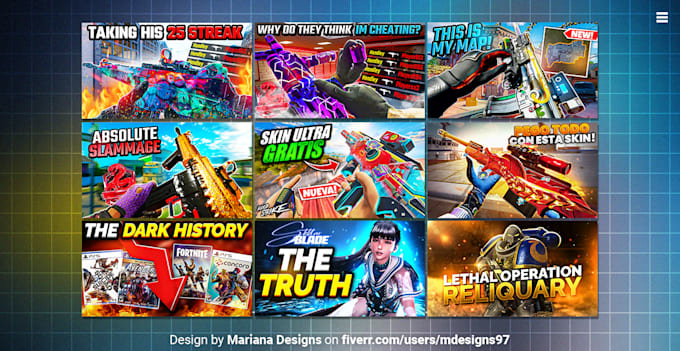
I will design gaming thumbnails for youtube
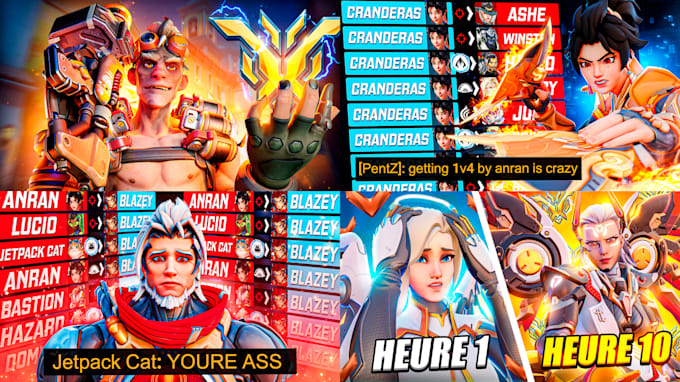
I will design eye-catching clickbait youtube thumbnails

I will draw cartoon youtube thumbnails
When to hire a thumbnail designer
Find the Right AI Tools on Memvers
Choosing between these tools depends on your volume, budget, and quality requirements. The Memvers AI tool directory catalogs hundreds of AI creative tools with real user reviews, pricing breakdowns, and feature comparisons.